Last modified 30 July 2003 by jdavis@math.wisc.edu
Inherits from NSObject
SMKTester wraps a high-level interface around the OpenGL selection mechanism. In doing so, it provides easy solutions to two common problems in interactive 3D programming:
In order to use SMKTester, you have to know just a bit about the underlying OpenGL selection mechanism. The essential steps in a selection are as follows.
The simplest application of SMKTester is to the problem of finding the world coordinates of a mouse click (or collision). For this use, you don't need to manipulate the OpenGL name stack at all.
Somewhere in your program's initialization, you create a tester and set its three parameters to 1:
    tester = [[SMKTester alloc] init];
    noMemoryError = [tester setMaxNumberOfResults:1 nameDepth:1 hitDensity:1];
Now, when your OpenGL view receives a mouse click at the NSPoint location, it does this:
    double *coords;
    [[self openGLContext] makeCurrentContext];
    [tester beginPickingWithRadius:1.0 x:location.x y:location.y];
    [self draw3DStuff];
    if ([tester endTestComputingCoordinates:YES])
        if ([tester numberOfResults] > 0)
            coords = [tester coordinatesForResult:0];
If you reach the last line, then coords is a vector containing the world coordinates of the click.
As already mentioned, the draw3DStuff drawing method used here need not manipulate the name stack. In fact, it must not manipulate the name stack, or else the tester will probably run out of memory, because we set its parameters so low.
In this example we assign a single identifying number to each object in our scene and use SMKTester to pick out objects according to these numbers. This is the most common use of SMKTester.
Let's say you have a program that displays three bicycles, which happen to be painted red, green, and blue. Somewhere in your program's initialization, you allocate and configure a tester.
    tester = [[SMKTester alloc] init];
    noMemoryError = [tester setMaxNumberOfResults:1 nameDepth:1 hitDensity:3];
The "hit density" is set to three because your program displays three identifiable things. Now, somewhere you have a drawing method that looks like this:
- (void)draw3DStuff
{
    [redBike drawBike];
    [greenBike drawBike];
    [blueBike drawBike];
}
That's fine for ordinary drawing, but in order for SMKTester to identify objects in our scene, you need to label them with numbers. This is the name stack manipulation mentioned in the introduction.
- (void)draw3DStuffWithNames
{
    glLoadName(1);
    [redBike drawBike];
    glLoadName(2);
    [greenBike drawBike];
    glLoadName(3);
    [blueBike drawBike];
}
With this method defined, you are ready to handle picking. When you receive a mouse click at the NSPoint location, you do something like this:
    unsigned int *result;
    [[self openGLContext] makeCurrentContext];
    [tester beginPickingWithRadius:1.0 x:location.x y:location.y];
    [self draw3DStuffWithNames];
    if ([tester endTestComputingCoordinates:NO])
        if ([tester numberOfResults] > 0)
            result = [tester namesForResult:0];
If you reach the last line, then *result is a number identifying the object that was clicked: 1 for the red bicycle, 2 for the green bicycle, and 3 for the blue bicycle, as we labeled them in the drawing method.
You don't have to restrict yourself to one name per object. You can give objects multiple names that describe how they relate to one another. In this section, we exploit the name stack to implement such a name hierarchy.
Suppose again that we're drawing bicycles, with exactly the same draw3DStuffWithNames method used above. That method distinguished the three bicycles, but this time we want to be able to distinguish the bicycles' wheels individually. To do this, we insert name stack manipulations into the code that draws a single bicycle:
- (void)drawBike
{
    // draw frame of bicycle here
    glPushName(1);
    // draw front wheel here
    glLoadName(2);
    // draw back wheel here
    glPopName();
}
This causes the bicycle's front wheel to carry an extra name of 1 and its back wheel to carry an extra name of 2. If we run our picking (or collision test) with this code, and the user clicks on the frame of the red bicycle, a result of 1 will be returned, as before. But if the user clicks on the front wheel of the red bicycle, the result will be the pair (1, 1), and if the user clicks on the back wheel, the result will be (1, 2). Similarly, if the user clicks on the front wheel of the blue bicycle, the result will be (3, 1). Later we'll see how to process these results.
Actually, if we run this code right now, it might fail, because we did not configure the SMKTester appropriately. At the start of the program, we should have specified higher name depth and hit density:
    tester = [[SMKTester alloc] init];
    noMemoryError = [tester setMaxNumberOfResults:1 nameDepth:2 hitDensity:9];
In summary, SMKTester's beginPickingWithRadius:x:y: and beginCollisionWithRadius:fromPoint:toPoint: prepare the name stack for you, leaving it with a single entry, 0. glPushName() pushes a name onto the stack, glPopName() removes the top name from the stack, and glLoadName() changes the top name on the stack. You do not need to pop the stack down to its original height when you're finished drawing your scene. This stack-based approach works very naturally if the objects you're drawing are hierarchical models.
To optimize performance, you might want to have two scene renderers, one for ordinary drawing and one for selection. The ordinary renderer manipulates normals, lighting, colors, textures, etc. as usual. The selection renderer avoids all of these calls, which do not affect the intersection of primitives with the selection region anyway, and instead issues calls manipulating the name stack. (But if you want, you can combine all of your lighting/coloring code and selection code in a single routine; OpenGL ignores name stack manipulations performed outside of a selection process.)
Now that we've seen examples of SMKTester's use, we'll explore its methods more systematically. As was shown in the first example, you must explicitly configure three parameters before using a tester:
If you set the maximum number of results to some number N, then the SMKTester will report only the N closest results of a test. Here "closest" means closest to the viewpoint (in the case of a picking) or the starting point (in the case of a collision test). For efficiency, you should allow only as many results as you will actually use. Often, you are only interested in the closest result, so you set the maximum number of results to 1.
The name depth indicates the maximum depth that the name stack is expected to achieve during the selection process. If you're not using a name hierarchy, then this number can be 1.
The hit density indicates the maximum number of hits that your scene can generate in a single test. In general, this is the maximum number of distinctly named, colinear objects in your scene.
The name depth and hit density together determine the size of the buffer that SMKTester uses to collect information from OpenGL. If this buffer is not large enough, then the entire selection mechanism breaks down. (The numberOfResults method later reports a negative value if such an error has occurred.) So you must be sure to give adequately large values for the name depth and hit density. There is no penalty, other than a little wasted memory, for making them too big.
- (BOOL)setMaxNumberOfResults:(unsigned int)number nameDepth:(unsigned int)nameDepth hitDensity:(unsigned int)hitDensity;Resizes the tester's dynamic memory to support the three new parameter values. By default, all parameters are 0. This method returns YES if and only if no memory allocation error occurred.
- (unsigned int)maxNumberOfResults;
Returns the maximum number of results that can be reported.
Returns the maximum name depth expected by the tester.
Returns the maximum hit density expected by the tester.
Once your SMKTester is configured, you are ready to perform pickings and collision tests. Let's start with picking. After the user clicks on your view, you pass the (X, Y) coordinates of the click to this method:
- (id)beginPickingWithRadius:(double)radius x:(double)x y:(double)y;Prepares the picking mechanism for drawing. The radius measures the imprecision of the pick in pixel coordinates; a typical value is 1. Pass the coordinates of the mouse click as the x and y arguments. This method issues OpenGL commands.
After invoking beginPickingWithRadius:x:y: you render the entire scene again (or at least the parts you want to include for picking), manipulating the name stack as described earlier. When you are done drawing, invoke the following method to end the picking:
- (BOOL)endTestComputingCoordinates:(BOOL)doCompute;Ends a picking or collision test, collecting and sorting the results for your later inspection. If doCompute is YES, then this method also computes the world coordinates for each result. This method returns NO if and only if it attempted to compute coordinates and failed; in this case, the selection names will be correct, but the coordinates will be invalid. This method issues OpenGL commands.
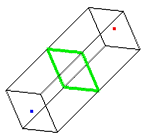
In the next section we'll see what to do with the test results. First we should learn how to perform a collision test, which is very similar to a picking. The collision test is performed in a box-like region in world space. The box must have a square cross section (shown in green in the picture); half of the side length of this square is called the box's "radius". The axis of the box runs from a starting point (shown in red) to an ending point (shown in blue).
In order to begin a collision test with such a box, use this method:
- (id)beginCollisionWithRadius:(double)radius fromPoint:(double *)startPoint toPoint:(double *)endPoint;Prepares the collision mechanism for drawing. The radius measures half the side length of the box bounding the collision region. The box's axis runs from startPoint to endPoint. This method issues OpenGL commands.
After preparing the collision test with this method, the rest of the test is identical to a picking. Render the scene again (or at least the parts that you want in the collision test), manipulating the name stack as in a picking. When you are done, call endTestComputingCoordinates:, passing it YES if you intend to use the world coordinates of the collision results later.
Perhaps an example would be helpful. Say you want to fire a laser from point A to point B in your scene. To do this, run a collision test with starting point A, ending point B, and a small radius. This performs selection in a very narrow box from A to B. If you get no results, then the laser made it to B without hitting anything. If you get results, then the names of the first result identify the object that the laser hit.
Once you have completed a test, you can start processing the results. Recall that the results are sorted according to distance (from the camera, in the case of a picking, and from the starting point, in the case of a collision test), with the closest results first. The first thing to determine is how many results were generated.
- (int)numberOfResults;Returns the number of available test results. This number will be negative if the tester ran out of memory during the selection process.
If you're interested in identifying the selected objects in your scene, then you need to get ahold of the names for each result using the following two methods. The results are indexed from 0.
- (unsigned int)numberOfNamesForResult:(unsigned int)resultIndex;Returns the number of names stacked for the indicated result.
- (unsigned int *)namesForResult:(unsigned int)resultIndex;
Returns a pointer to the first name of the indicated result; treat this pointer as an array to get the remaining names. This pointer becomes invalid when the tester's memory is reallocated in setMaxNumberOfResults:nameDepth:hitDensity:.
If you want to get the world coordinates of a particular result, then you can use the following method. Due to inherent limitations in how the selection region is constructed, the coordinates will not be exact. Generally, smaller radii produce more precise coordinates.
- (double *)coordinatesForResult:(unsigned int)resultIndex;Returns a pointer to the approximate world coordinates of the indicated result; regard the pointer as an array with three entries. If you told endTestComputingCoordinates: not to compute coordinates, or if that method returned false, then these coordinates are invalid. Also, the pointer itself becomes invalid when the tester's memory is reallocated in setMaxNumberOfResults:nameDepth:hitDensity:.
As already mentioned, the selection process will fail if SMKTester runs out of memory. You detect this error when numberOfResults returns a negative value. If this happens, choose larger values for the name depth and hit density.
It is sometimes possible for OpenGL to overlook objects in the selection region. For example, if a polygon is facing away from the camera and OpenGL is configured to cull such back-facing polygons, then the polygon will be missed. Depending on your application, you might want to temporarily disable backface culling in your selection renderer.
A polygon in the selection region will also be missed if it happens to be perfectly parallel to the region's axis. Such parallelism would be unlikely were it not for programmers' natural inclination to use round numbers; it can easily happen if you perform a vertical collision test in the middle of a vertical wall, for example. If you must be absolutely sure that no objects intersect the selection region, you might want to perform collision tests from two or three different directions.