Last modified 24 August 2003 by jdavis@math.wisc.edu
Inherits from NSObject
Conforms to NSCoding, NSCopying, SMKDrawing, SMKManagedDrawing
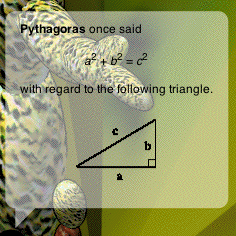
In comic books, the words that a character speaks or thinks are commonly drawn in a "bubble" floating near her head. SMKBubbleDrawer lets you put such a bubble into an SMKSceneTree. The bubble can be translucent, and its text can be as richly formatted as any NSAttributedString. Just for fun, here's a half-transparent bubble filled with the contents of an RTFD file in which a picture was embedded:
The bubble is a 2D sprite, drawn in the NSView to which your OpenGL context is attached. SMKBubbleDrawer relies heavily on SMKDrawingManager; you must ensure that the intended drawing manager is current before drawing the bubble. This entire mechanism requires Mac OS 10.2, and the view must be configured according to the directions in the SMKDrawingManager documentation. Furthermore, SMKBubbleDrawer assumes that the depth range (of eye coordinates) is [0, 1], the default.
As a sprite, SMKBubbleDrawer doesn't naturally interact with the 3D scene - for example, its boundingRadius is always zero - but it tries its best. The bubble declines to draw in the following situations:
The first few methods control various aspects of the bubble's size.
- (id)setMaxTextSize:(NSSize)maxTextSize tailSize:(NSSize)tailSize margin:(float)margin;Sets the maximum text rectangle size allowed, the size of the tail, and the size of the margins, all in pixels. If the tail's height is 0, then no tail will be drawn.
Returns the maximum size that the bubble's text rectangle is allowed to achieve.
Returns the tail size.
Returns the size of the margins.
The next two methods control the bubble's background color, including an alpha channel for translucency.
- (id)setColor:(NSColor *)color;Set's the bubble's background color to the given color (by copying it).
Returns the background color.
The most frequently used method is the one that sets the bubble's text.
- (id)setAttributedString:(NSAttributedString *)attributedString;Sets the bubble's text to the given attributed string (by copying it).
Returns the text of the bubble.
Three standard types of bubble are supplied - one for speaking, one for thinking, and one for pointing something out.
- (id)setBubbleType:(int)bubbleType;Sets the type of bubble to be drawn. Valid types include SMKSpeechBubble (the default), SMKThoughtBubble, and SMKArrowBubble.
Returns the bubble type.
You are free to add more bubble types in subclasses. If your bubble background is simply a filled NSBezierPath, as the standard ones are, then you need override only bezierPathForTextRectangleSize:x:y:. If you want to draw bubbles in a completely different manner, then you must override drawBackgroundWithTextRectangleSize:x:y: and managedDrawerContainsPoint:.
When overriding either bezierPathForTextRectangleSize:x:y: or drawBackgroundWithTextRectangleSize:x:y:, keep the following points in mind. In the flipped coordinate system of the underlying NSView, the bubble should be drawn upside down in a rectangular area extending up and to the right of the given (x, y) location. The width of the rectangular area should not exceed size.width + 2.0 * margin, while the height should not exceed size.height + 2.0 * margin + tailSize.height. After the bubble is drawn, its text is drawn in a rectangular area of size size starting at (x + margin, y + margin).
- (id)bezierPathForTextRectangleSize:(NSSize)size x:(float)x y:(float)y;Returns an NSBezierPath that describes the bubble background. You do not call this method directly, but you may override it when creating new bubble types.
- (id)drawBackgroundWithTextRectangleSize:(NSSize)size x:(float)x y:(float)y;
Draws the background of the bubble and returns the receiver. You do not call this method directly, but you may override it when creating new bubble types. The background color is set before this method is called. If you override this method, then you should also override managedDrawerContainsPoint:.
Because the bubble is drawn on the NSView's surface, which lies above the NSOpenGLContext, it does not appear to be "in the 3D scene". By default, the bubble is drawn, even if it should be occluded - that is, blocked from view - by other elements in the scene. SMKBubbleDrawer is able to test explicitly whether the bubble should be occluded or not. If this test is enabled, and if the lower left corner of the bubble is occluded, then the bubble will not draw.
- (id)setCanBeOccluded:(BOOL)canBeOccluded;Sets a flag which controls whether the bubble can be occluded. By default, it cannot be occluded.
Returns YES if and only if the bubble can be occluded.
SMKBubbleDrawer's last methods control how the bubble calculates its width. As far as I can tell, this is useful only when drawing text with a mixture of left- and center-alignment.
- (id)setFormattingType:(int)formattingType;Sets the current formatting type. If it's SMKFormatBubbleOnce (the default), then text is formatted and the bubble is shrunken to hug the text block closely. SMKFormatBubbleWide produces the same effect, except that width of the text block is always taken to be the maximum text width (as set in setMaxTextSize:tailSize:margin:). SMKFormatBubbleTwice causes the bubble to obtain a text block size and then reformat inside that text block, centering the centered text relative to the longest line; this produces the best effect, but requires two passes.
Returns the current formatting type.